
Finding and merging duplicates
Find similar requests and merge duplicate feedback while keeping discussion and votes together.
Users may describe the same request in different ways. One person asks for dark
mode, another for a night theme, and a third wants the app to follow their system
appearance setting. Without duplicate detection, these requests remain separate
posts with separate vote counts.
FeedLog can match these posts by meaning rather than by keyword. A manager or
owner can then merge them into one thread without losing votes.
How similarity detection works
When feedback is created or edited, FeedLog sends its title and body to an
embedding model and stores the returned 768-dimensional vector with the post.
FeedLog compares these vectors to rank posts by semantic similarity, even when
the posts do not share any words.
For example, "Night theme please" and "Dark mode for the dashboard" have no
words in common. A keyword search for one would not find the other, but their
vectors can still be close enough to rank them together.
Suggestions are rankings, not confirmation of a duplicate. FeedLog returns
the closest posts without applying a similarity cutoff. Even when no close match
exists, the list still contains the three nearest posts. A manager or owner must
decide whether two posts describe the same request.
Semantic suggestions exclude posts without an embedding. FeedLog generates
embeddings in the background after a post is saved, so a new post may take a
short time to appear in semantic suggestions. Posts created without an AI key,
and posts for which embedding generation failed, do not receive an embedding
automatically later. They remain available through text search but require a
backfill before semantic matching can include them. See
Configuring external services for instructions.
Posts already merged into another post are excluded from every suggestion list.
Where suggestions appear
In the submission form
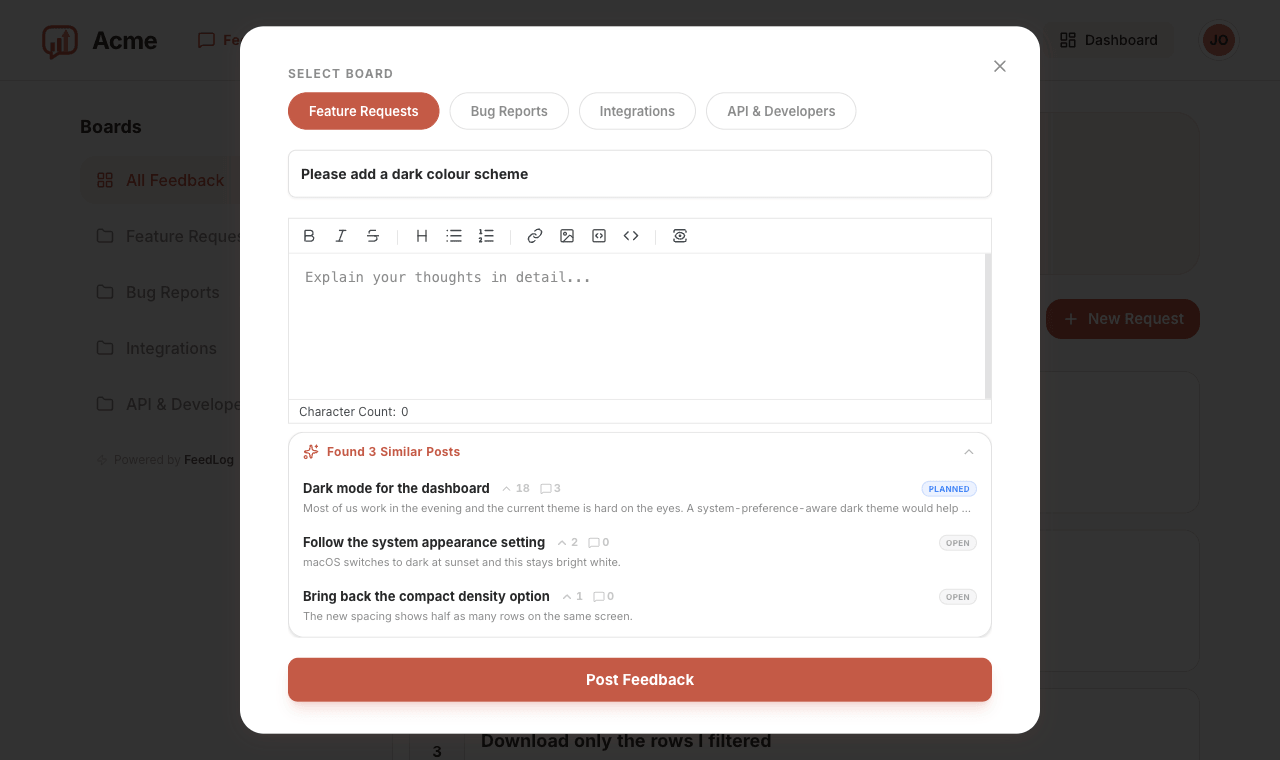
The submit form searches while the user types. Once the title reaches three
characters, the Found 3 Similar Posts panel appears below the editor and
refreshes shortly after typing stops. If the body already contains text, the
panel appears collapsed so it does not cover the editor.
Selecting a suggestion opens the existing post. The user can then vote for that
post instead of submitting another copy of the same request.
On the post page
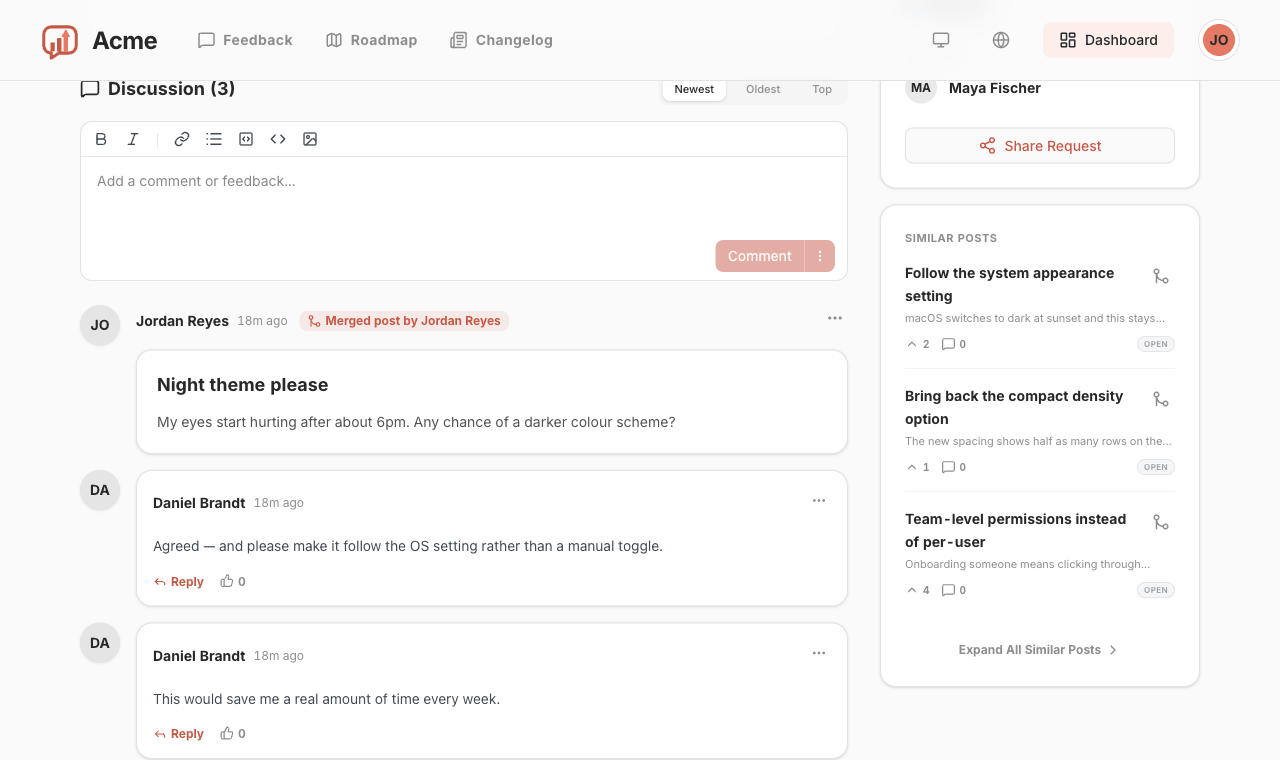
Each post that has not been merged has a Similar Posts card in its sidebar.
The card lists the three closest posts, and Expand All Similar Posts shows up
to ten. Anyone can see the card, whether signed in or not.
Managers and owners also see a merge icon on each row, allowing them to start a
merge directly from the sidebar.
Merging posts
Merging is limited to managers and owners. There are two entry points:
- The merge icon on a row of the Similar Posts card, which offers Merge
into current and Merge current into this. - The post's merge menu, with Merge to this post and Merge this post
into…. The dialog initially lists the ten closest posts. Entering text in
its search box replaces that list with three matches for the search text.
The merge direction determines which post remains active. Users can continue to
vote and comment on that post. The other post displays a link to it.
Choosing the retained post
Prefer the post with the clearest title. It does not have to be the post that was
submitted first.
After a merge, the merged post keeps its URL and remains accessible. A This
post was merged into banner links to the retained post. The merged post no
longer appears in the feedback list, search results, roadmap, or suggestion
lists. Users cannot vote or comment on it, and it cannot be deleted until it is
unmerged.
The retained post gains a card in its comment timeline for the merged post. The
merged post's comments can be loaded from this card. The comments are not copied;
they remain attached to the post on which they were written.
Followers of the merged post continue to receive status updates from the retained
post. This preserves notifications for the person who submitted the duplicate.
You can merge a post that already contains merged posts; the complete group moves
with it. You cannot merge into a post that has itself been merged. FeedLog rejects
the operation to prevent a chain of redirects.
How votes are combined
The retained post's vote count becomes the number of distinct people who
voted on any post in the merged group. FeedLog does not simply add the two vote
counts.
If a post with 17 votes absorbs one with 4, and two people voted on both, the
retained post has 19 votes. This applies the same one-person, one-vote rule used
elsewhere in FeedLog. Anyone who voted on the merged post also counts as having
voted on the retained post and cannot add another vote.
The merged post retains its original vote count. Its votes remain attached to it
and are counted separately again if the posts are unmerged.
Unmerging
Open the retained post, find the merged card in its comment timeline, and select
Unmerge from its menu.
The merged post becomes a regular post again. It reappears in the feedback list,
search results, and roadmap, and users can vote and comment on it. Both vote
counts are recalculated immediately. The retained post no longer counts people
who voted only on the former duplicate, but it continues to count people who
voted on both posts.
Votes and comments remain attached to their original posts throughout the merge,
so unmerging does not need to restore or copy them.
After unmerging, the merge card is removed from the timeline and no merge record
remains there. Votes cast on the retained post while the merge was active remain
on that post.
Without an AI key configured
Degraded, not disabled
On a self-hosted instance without OPENAI_API_KEY, the panels, dialogs, and
merge operations described on this page remain available. Only the similarity
method changes: FeedLog falls back to trigram text distance over the title and
body, comparing character sequences instead of meaning.
Typos and nearly identical phrases can still match. Different wording may not:
"Night theme please" and "Dark mode for the dashboard" no longer match each
other. The interface does not indicate when text matching misses a semantically
similar post.
Adding the key later generates embeddings only for new or subsequently edited
posts. Older feedback must be backfilled.
More in Managing feedback
Creating and managing boardsCreate and organize boards, describe their purpose, and control who can submit feedback.How feedback worksUnderstand feedback submission, attachments, voting, comments, statuses, and notifications.Roadmap and changelogShare planned work on your roadmap and publish shipped changes in your changelog.